Early access, in development. Built inside a real contracting company.

QUOTE IT / RUN IT / BILL IT / GET PAID

Run every job from estimate to paid, without running the office after hours.

Shop Marshal carries every job on one connected record. The estimate becomes the quote, the quote becomes the job, the job becomes the invoice, and nothing gets retyped or rebuilt on the way. You should not have to be the system holding your company together.

Built inside a real contracting company. Used on real jobs. No mockups.

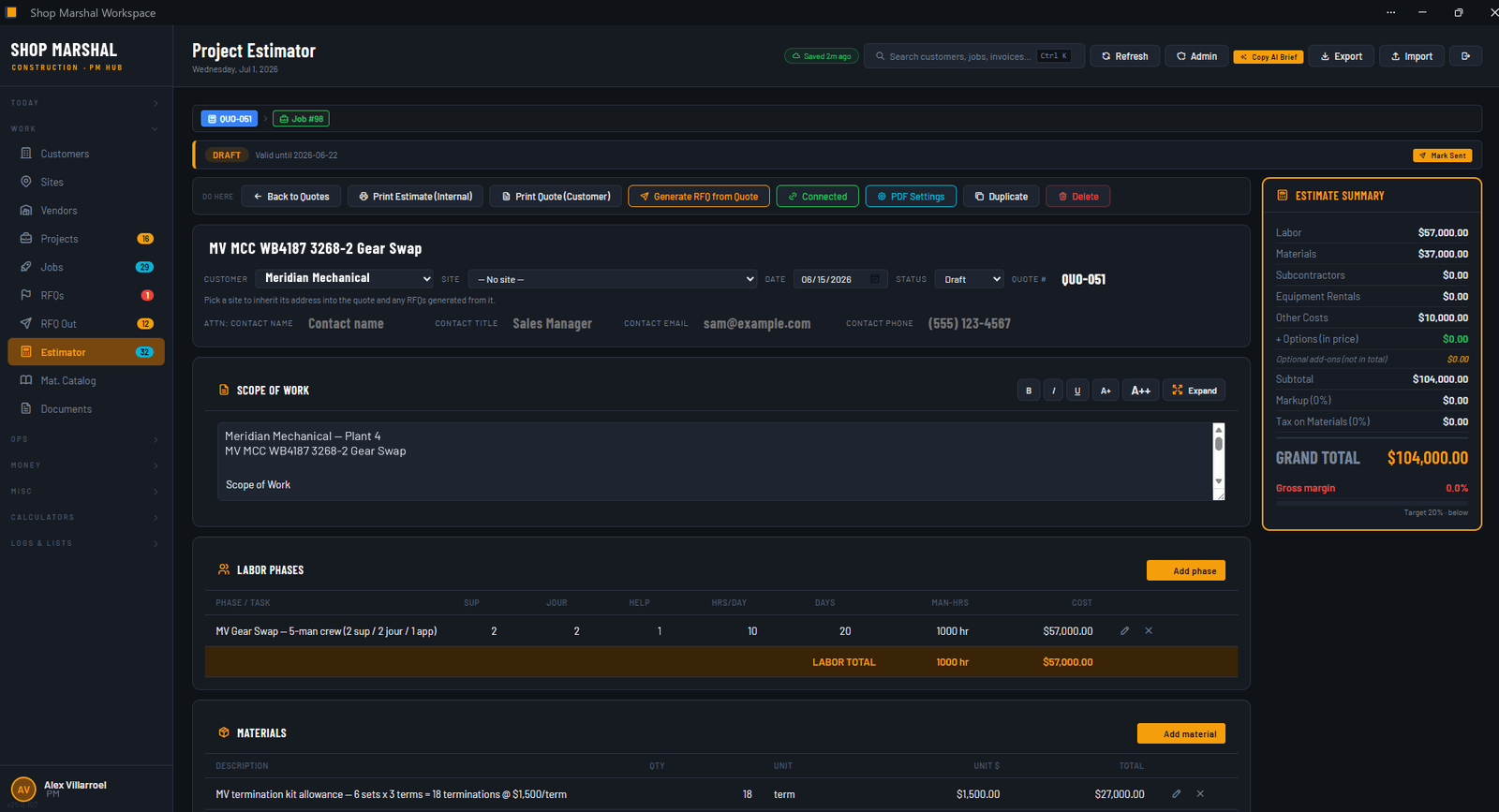
Project Estimator screen: scope of work, labor phases, and materials building to a quoted grand total

Real screen, not a mockupOne record, from cost catalog to quote out the door.

01 / The two bad choices

Right now, you get two bad choices.

Archetype: duct tape

The spreadsheet duct-tape stack

Estimates in a spreadsheet, the schedule on a whiteboard, dispatch by group text, hours on whatever paper made it back to the office. Friday night you sit down to invoice and reconstruct the week from all of them. Nothing talks to anything, so you are the integration.
Archetype: overbuilt

The enterprise stack

Built for billion-dollar GCs with a training budget and a rollout committee. It takes a consultant to stand up and a full-time admin to keep fed. It assumes you have an IT staff. You have a truck.

Shop Marshal is built for the companies in between: owner-operators and project managers at small and mid-size specialty contractors and general contractors.

02 / What it does

One connected record, from estimate to paid.

Work enters as an estimate and leaves as a paid invoice, and it never changes systems on the way. That is the whole idea, and this is the line it travels.

  1. Estimate
  2. Quote
  3. Job
  4. Invoice
  5. Paid
CA-01

Win the work

Log the RFQ, build the estimate from a cost and materials catalog instead of last year's spreadsheet, and send the quote from the same record. When it lands, the estimate becomes the job. Nothing gets retyped. The pipeline board shows every open pursuit at a glance, and the quote cover email drafts itself from the record.

RFQEstimateQuoteCatalogPipeline
CA-02

Keep it moving

Jobs, sites, and tasks live where the schedule lives. Dispatch the crews without the group text, capture time where the work happens, and file the daily field report before the truck leaves the site. Change orders get written down the day they happen, not remembered at billing. A My Day view and the ops calendar tell every person what today looks like before the first phone call.

DispatchCrewsTimekeepingField reportsChange orders
CA-03

Protect the margin

Job cost lands against the estimate as the work runs, so you see the margin while you can still defend it. Vendor POs and AP live next to the work they belong to, and buyout starts in the same place: send your own RFQs out to vendors and turn the winning answer into the PO. WIP without a weekend of spreadsheet surgery.

Job costVendor POsAPBuyoutWIP
CA-04

Bill the work

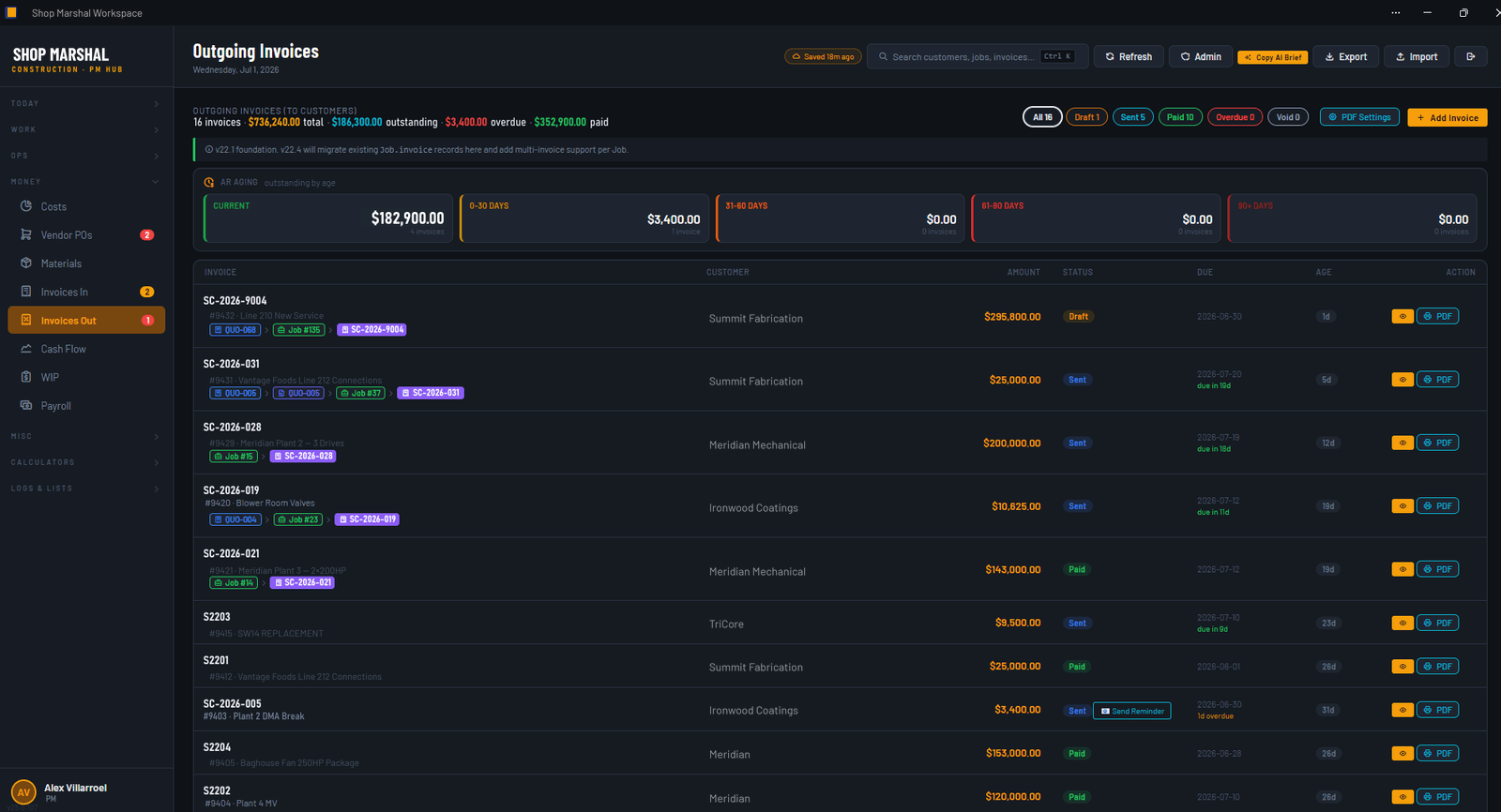
Customer invoices and pay applications build from the job record, so Friday night stops being an archaeology dig. You bill the work without rebuilding it. And cash flow stops being a feeling: AR aging you can look at on a Tuesday, not just at tax time.

InvoicesPay appsARCash flow

03 / See it

Real screens from a working system.

Nothing below is a mockup. These are screenshots of the real system, built and used on real jobs. The product version will get its own coat of paint, but this is the machinery.

SCR-01 // Win the workOne record from cost catalog to quote out the door.
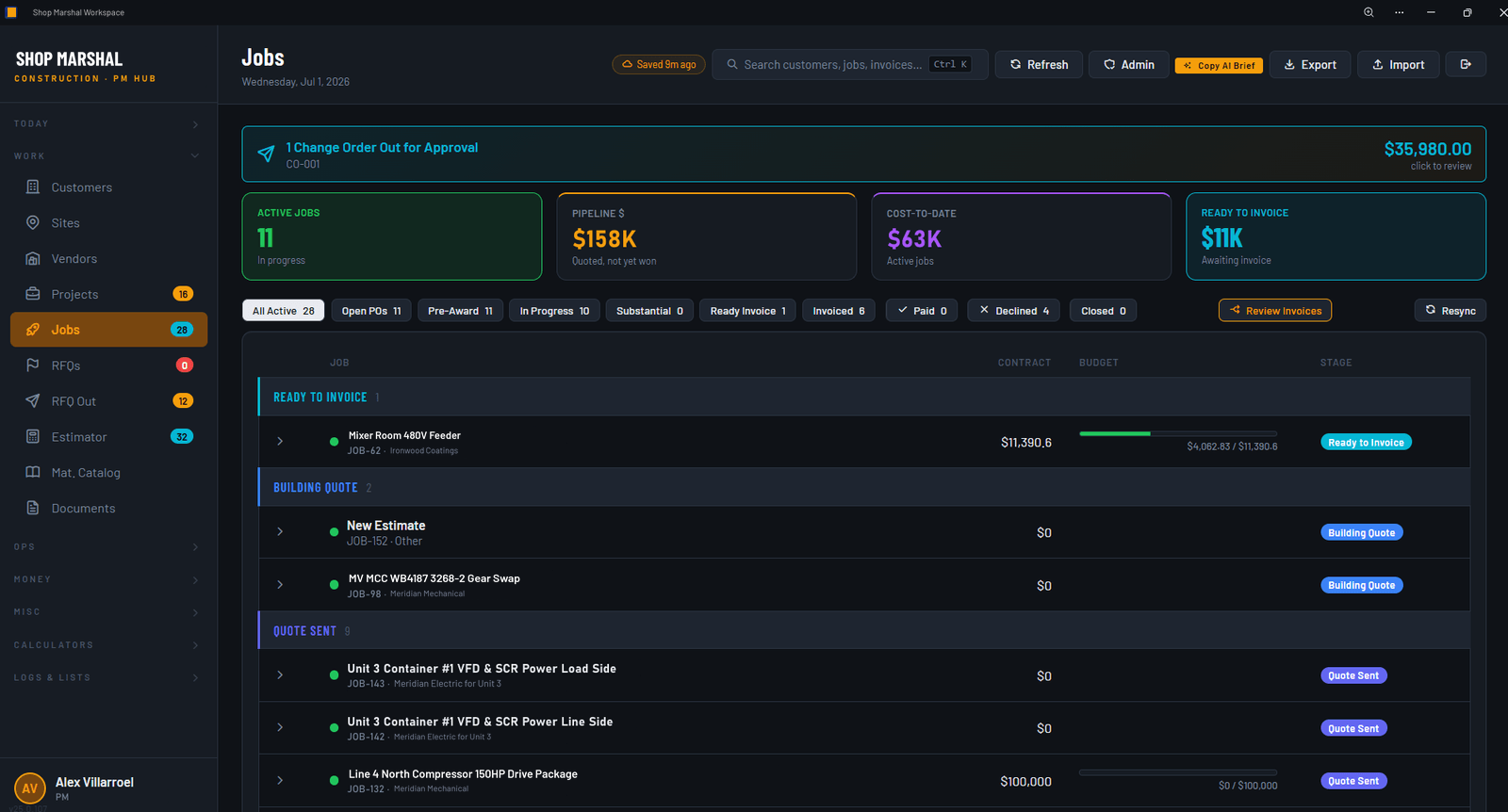
SCR-02 // The job recordEvery job with its site, tasks, and paper trail in one place.
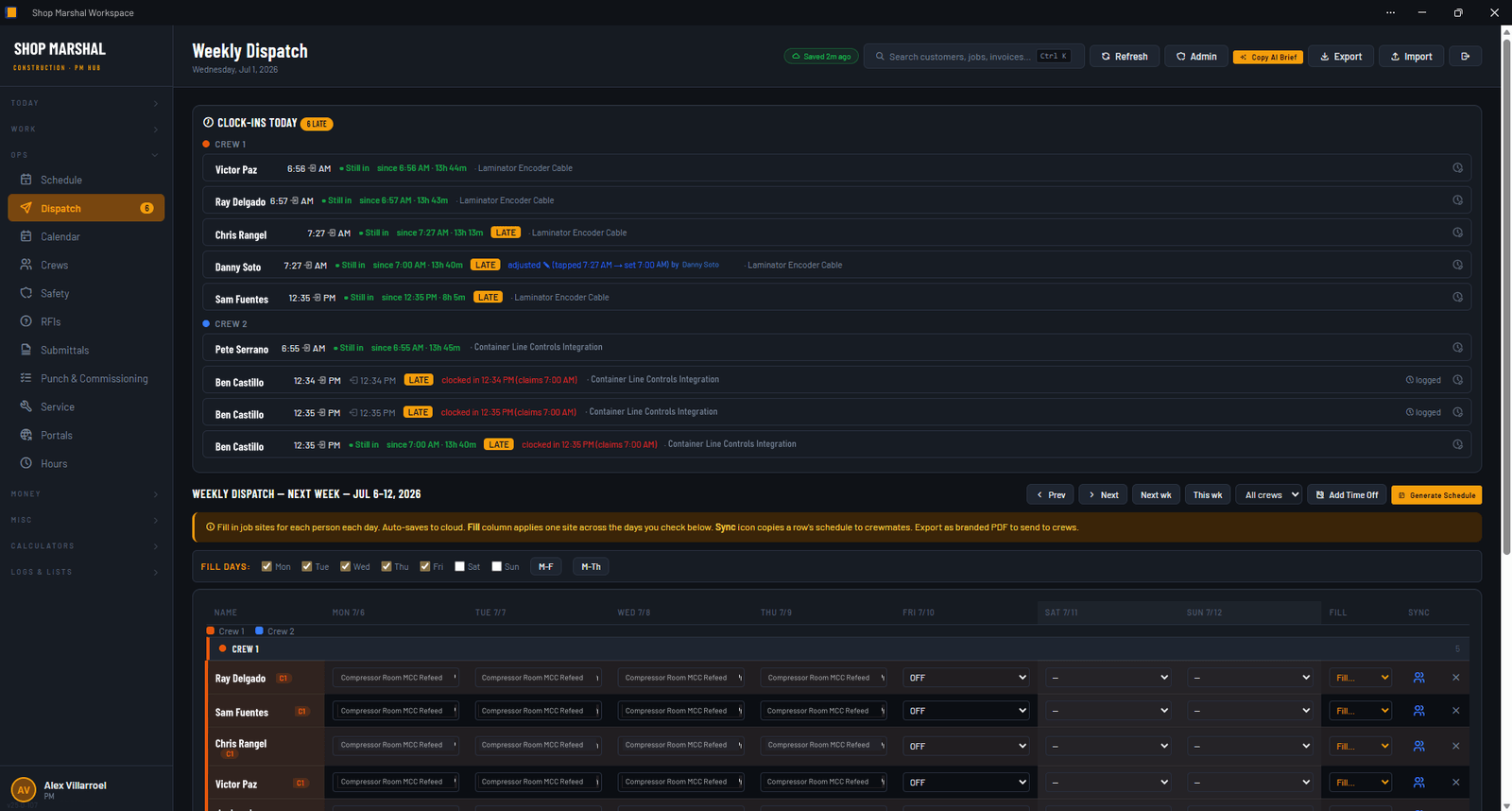
SCR-03 // Keep it movingThe whiteboard, except the crews can see it.
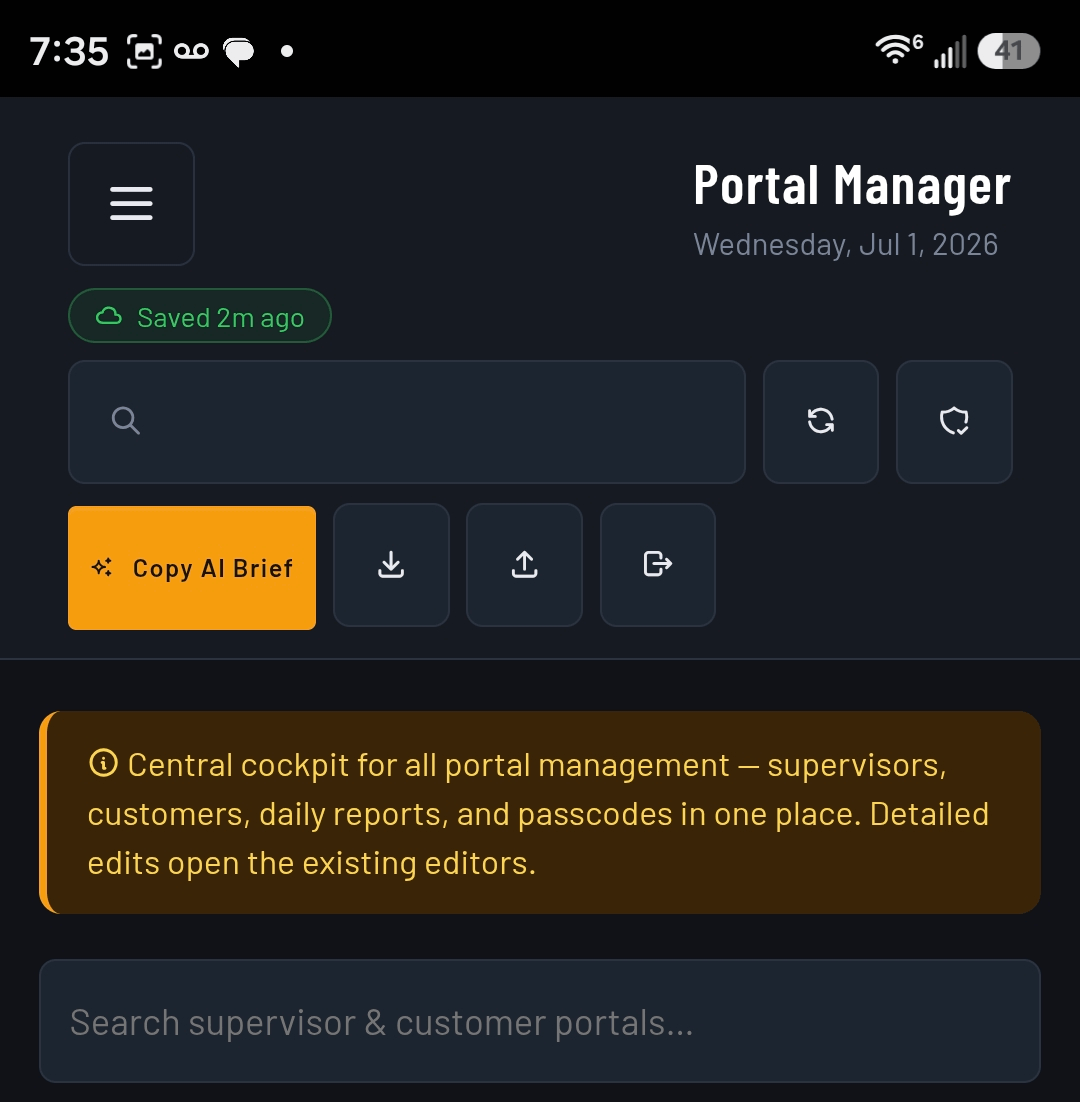
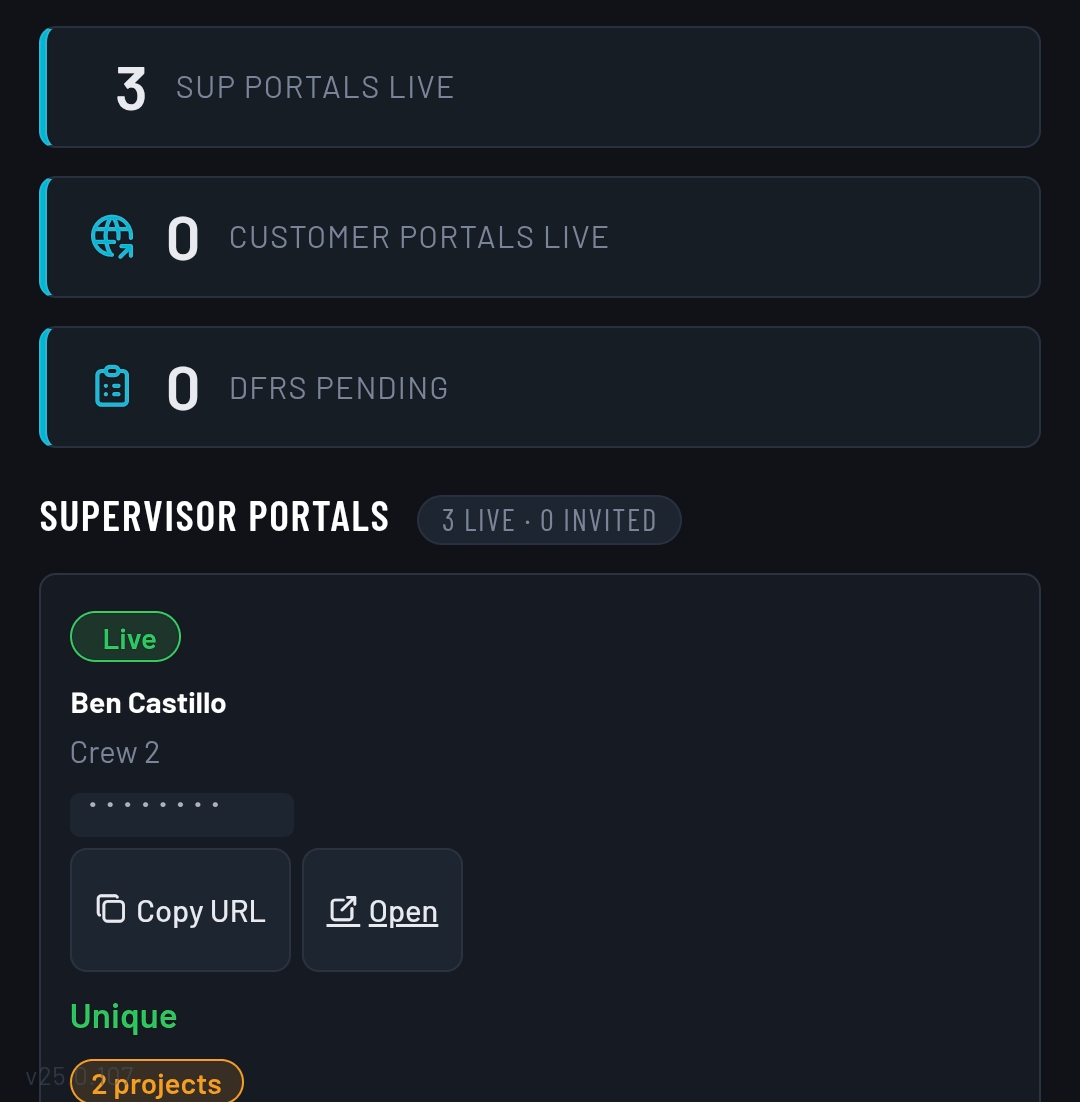
SCR-04 // Portal managerSupervisors, customers, and daily reports, run from one cockpit.
SCR-05 // Bill the workBilling built from the job record, not rebuilt from memory.
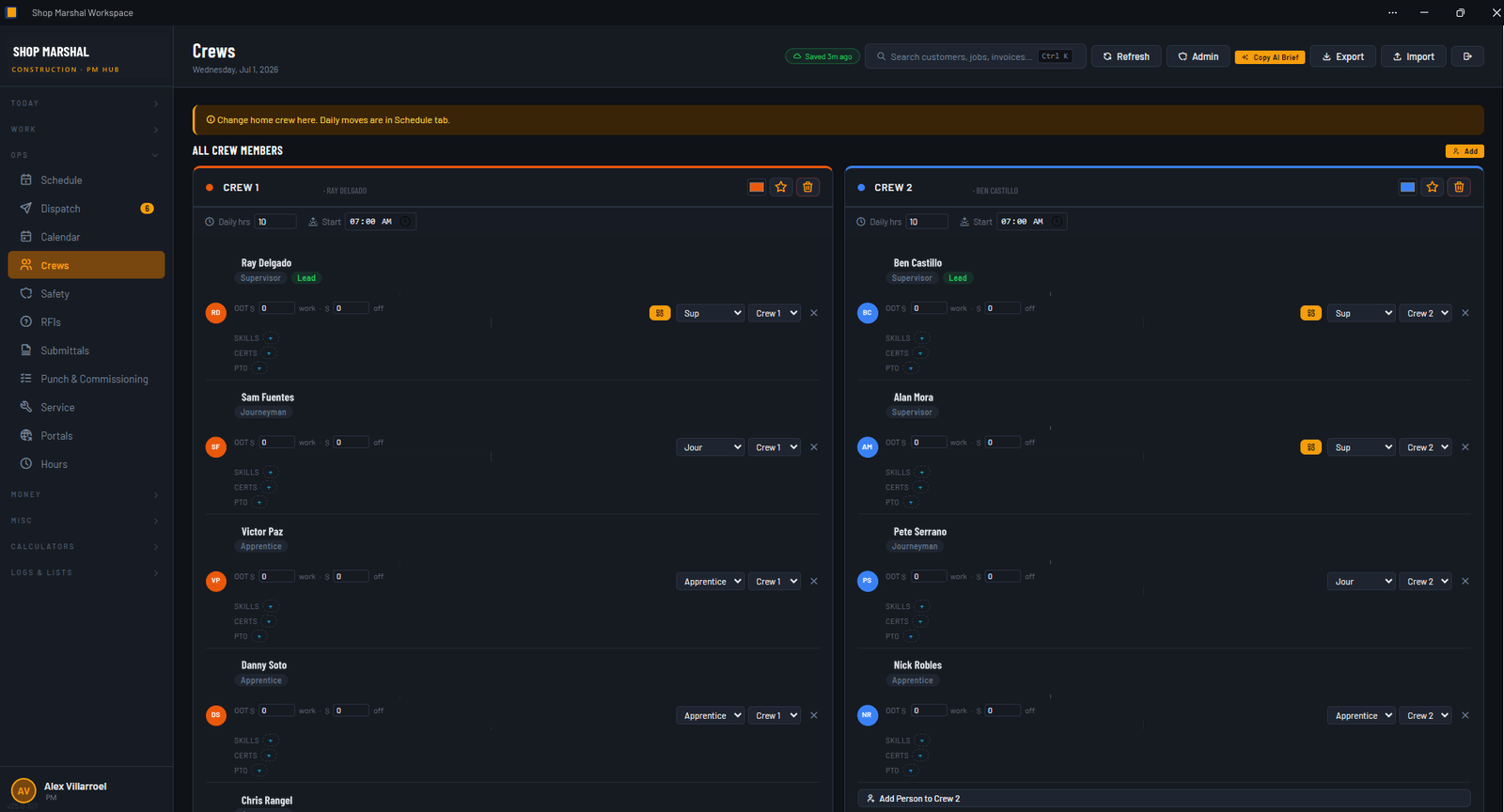
SCR-06 // Crews + timekeepingWho is where this week, and the hours to prove it.

Names, company names, branding, and personal fields in these screenshots are replaced or masked. The workflows shown are real.

04 / Field and office

The field and the customer read the same gauges.

The portals take you out of the middle of every conversation.

Supervisor portal

The supervisor sees the day's jobs, files the daily field report, and logs crew time from the site. No calling the office to ask what is next. No paper timesheets riding home in the glovebox.

Customer access

The customer can see where their job stands without making your phone ring. Quotes, progress, invoices: the questions that used to interrupt your day become a page they can open themselves.

The owner stops being the human router between field, office, and customer.

The app and both portals install on a phone straight from the browser. No app store. The field does not carry a laptop, so the system does not assume one.

05 / The paper trail

The paperwork nobody wants and every job needs.

Every job drags a paper trail behind it, and on most jobs it lives in six inboxes and a truck cab. Here it lives on the job record, next to the money it explains. When someone asks for it in two years, it is one search away instead of one panic away.

The construction admin record and the money, in the same system. That is the point.

06 / The document engine

The documents build themselves from the job.

The paperwork the job has to send out generates straight from the job record, branded and ready to go. No retyping numbers into a template, no hunting for the version that was actually right. This is the part of Friday night that stops existing.

Quote Invoice Purchase order Change order Schedule of values AIA G702/G703 pay application Cost breakdown Labor breakdown Payroll report Closeout package

Once Dropbox is connected, every document files itself into the right company folder, named and sorted, without anyone dragging files around.

07 / The AI layer

An AI that does the office work and cannot invent the math.

Shop Marshal builds guarded AI help into the office side of the system. It turns plain language into tasks, notes, and events you confirm before they land, and it comes with a library of ready prompts for the common back-office asks, so you do not have to figure out what to ask. When you want a second set of eyes, it hands you a privacy-safe snapshot of the job to take to an AI. The guardrail is the whole point: the money math lives in the app's own engine, so anything the AI helps draft is a draft, every number on the paperwork comes out of the app and not out of the AI, and nothing moves until a person reviews it.

From the prompt library You review before anything moves

"Pull AR aging and tell me who to call first."

"Draft an estimate for the panel swap from the catalog. I will review it before it moves."

"What did the crews log this week, job by job?"

"Generate the pay app and file it in the job folder."

08 / Who it's for

Built for the gap.

Not the billion-dollar GC with an IT department, and not the one-truck shop that runs on a notebook. The company in the middle, where one person is still holding the handoffs together by hand.

Electrical and controls

Panel builds, controls and instrumentation, service calls. Commissioning checks and closeout that actually close.

Mechanical and plumbing

Multi-crew jobs, change orders that move fast, and pay applications that have to tie out.

Industrial service

The small calls logged like real work, with the time and the paper trail to bill them.

Lean commercial GCs

RFIs, submittals, and AIA pay apps, without an enterprise rollout to run them.

If you are the owner-operator or the PM holding all of that together, this was built for you.

See if Shop Marshal fits

09 / Who's building it

Built inside a contracting company, not a pitch deck.

Shop Marshal did not start as a product. It started as the system Alex Villarroel built to run his own jobs, because the software written for him was built by people who had never run one.

Status Shop Marshal

Running

The source system runs a real contracting company.

The system this product grows from was built field-first and used on real jobs, covering estimating, crew scheduling, and invoicing. It was shaped by the work instead of a feature wishlist, and it is contractor-led: built by the person who has to live with it on a job site.

In build

The product version is in early-access development.

Shop Marshal is the multi-company version of that system. Your own data, your own portals, your own rollup. There is no launch date to promise, and it will not be invented to make a landing page look better. The early-access list hears everything first, and the earliest companies help shape what ships.

Straight answers

Is it live yet?

The source system is live and running a real contracting company. The multi-company product you would log into is in early-access development. Join the list and you will know the moment it opens.

Who is it for?

Owner-operators and project managers at small and mid-size specialty contractors and general contractors. Electrical and controls, mechanical and plumbing, industrial service, and lean commercial GCs. Built for the gap between a spreadsheet and an enterprise platform.

Is this just another project-management app?

No. Most tools stop at tasks and a calendar. Shop Marshal carries one connected record from the estimate all the way to the paid invoice, with the job cost, the paperwork, and the money on the same record. The office work is the point, not an afterthought.

Are the screens real?

Yes. The screenshots above are the real working system, with names and personal fields masked. If you want a closer look, book a live walkthrough and see it click through end to end.

How is the AI used?

It does the office drafting and lookups, and it cannot invent numbers. The money math lives in the app's own engine, so every figure on the paperwork comes from the app, and nothing the AI drafts moves until a person reviews it.

Who is behind it?

Shop Marshal is founder-built and contractor-led by Alex Villarroel, an industrial contractor, developed under Streamline Automation Solutions. He built the source system because he got tired of software written by people who never ran a job, and the product is shaped by the work it has to survive.

How do I get in?

Join the early-access list below. Early access goes out to that list, in order, as the product opens, and the earliest companies help shape what ships. No sales sequence, no inbox flood.

Shop Marshal

Join early access.

Early access goes out to this list, in order, as the product opens. If Friday night invoicing sounded familiar, this page was written for you.

Get product updates and the first invitations when early access opens. No sales sequence. No inbox flood.

Want to see it first? Book a live walkthrough. It is a screen share of the working system and straight answers to whatever you ask, not a sales pitch.